
Events Dec 4, 2025, 09:46 (UTC)
The Gift of Gifting
6
Learn how to send gifts through the Pearl Shop (F3)
How to Gift via Pearl Shop

- Once you’ve found an eligible item you want to send, click the icon shown above to purchase it.

- Enter or select the character name of the recipient and confirm it to send your gift.
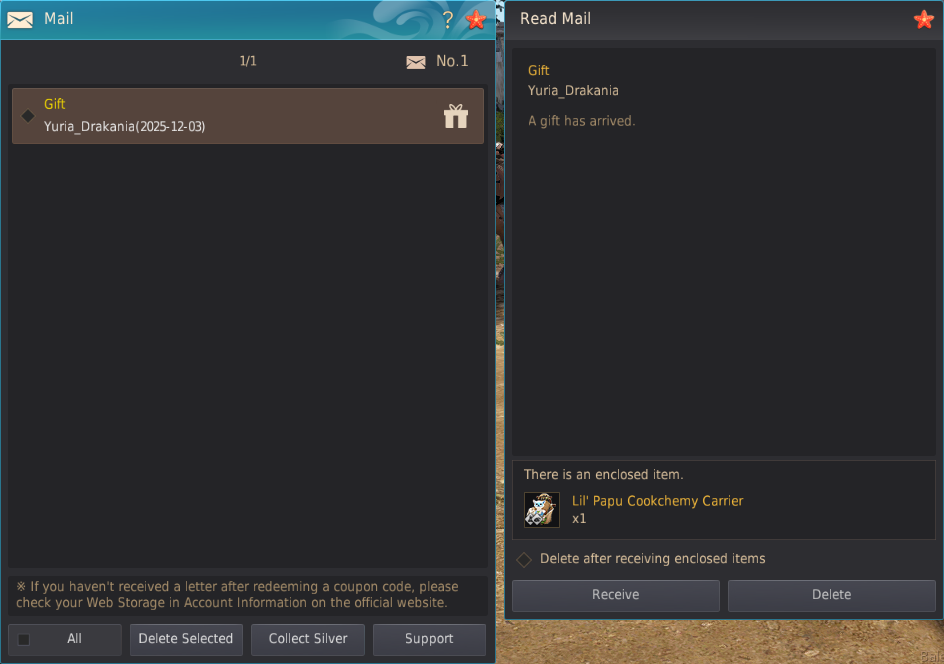
- Ask your friend to look in their in-game mailbox (B) for your gift!
* Additional Notices
- If you are found to have abused or exploited the Gifting Function, both the gift giver and giftee may be restricted in accordance with the Operational Policy.
- Please do not claim gifts from unknown or suspicious individuals. If you do receive a gift from an unknown or suspicious source, contact us via [Support] without claiming the item from your in-game mail (B).
- Pearl Abyss reserves the right to change or cancel the event depending on mitigating circumstances. If changes are made, they can be found on this event page.
- Participating in the event using inappropriate methods may result in a cancellation/retrieval of your reward(s) and/or restriction from the game.
- For any questions or concerns regarding the event, please contact us via [Support].
- Any content not mentioned on this page is subject to the [Black Desert Event Rules].
-
 [Events] Camp Tuvala Guild Event: Winter Season Welcome (back) to Black Desert! Get acquainted with the game by joining a Growth Guild today! Dec 11, 2025 (UTC)
 -
 [Events] Olvia Academy Has at Last Broken Ground! (Last Updated: 16/12/2025 08:30 UTC) Lend Your Hand to Its Rising! Dec 4, 2025 (UTC)
 -
 [Events] [Shakatu’s Month] Shakatu X Patrigio’s Special Shop Discover Shakatu & Patrigio's special wares for adventurers. Dec 4, 2025 (UTC)
 -
 [Events] Calpheon Ball Countdown with Special Drops (Last Updated: 12/04/2025 13:00 UTC) In celebration of Calpheon Ball 2025, Let's Count Down the Days! Dec 2, 2025 (UTC)

