
Marni’s Realm – Private Monster Zone
Dernière modification : 27 févr. 2026, 09:35 (UTC)

Marni's Realm allows you to enter a realm separate from the rest of the world to create a private monster zone.
When you enter a zone's Marni's Realm, you will be taken to a place that is identical in appearance to the monster zone you are in, with the same monsters and the same loot available from them as well, but you will be by yourself. You will not see any other Adventurer nearby.
You will need to first move to the designated area in any given monster zone to enter Marni's Realm.
Once inside, you cannot move outside the designated area while you are in the realm. If you want to go outside the area, you will have to leave Marni's Realm.
How to Enter
You can enter Marni's Realm by going to the designated area in each of the monster zones where this feature is available.
Open the window by going to Menu (hotkey: Esc) – Adventure (F5) – Private Monster Zone.

Once the window is open, select the navigation button and go to the designated area.
However, keep in mind that navigation is not available for monster zones in the desert.

Once you arrive at the designated area, you will see the Enter button appear on the left side of your screen.
Press the button to enter the Marni's Realm area for that monster zone.

Marni's Realm is available for the following monster zones:
- Bashim Base
- Desert Naga Temple
- Titium Valley
- Fadus Habitat
- Gahaz Bandits' Lair
- Crescent Shrine
- Cadry Ruins
- Tshira Ruins
- Polly's Forest
- Traitor's Graveyard
- Protty Cave
- Centaurus Herd
- Blood Wolf Settlement
- Sherekhan Necropolis (Day)
- Roud Sulfur Mine
- Pila Ku Jail
- Manshaum Forest
- Forest Ronaros Area
- Thornwood Forest
- Kratuga Ancient Ruins
- Aakman Temple
- Hystria Ruins
- Star's End
- Sycraia Underwater Ruins (Abyssal)
- Jade Starlight Forest
- Gyfin Rhasia Temple (Underground)
- Ash Forest
- Crypt of Resting Thoughts
- [Elvia] Biraghi Den
- [Elvia] Swamp Fogan Habitat
- [Elvia] Swamp Naga Habitat
- [Elvia] Saunil Camp
- [Elvia] Bloody Monastery
- [Elvia] Orc Camp
- [Elvia] Rhutum Outstation
- [Elvia] Primal Giant Post
- [Elvia] Hexe Sanctuary
- [Elvia] Troll Habitat
- Hautes terres d'Yzrahid
- Cité des morts
- Ruines de Tungrad
- Refuge des disciples des ténèbres
- Desert Naga Temple
- Titium Valley
- Fadus Habitat
- Gahaz Bandits' Lair
- Crescent Shrine
- Cadry Ruins
- Tshira Ruins
- Polly's Forest
- Traitor's Graveyard
- Protty Cave
- Centaurus Herd
- Blood Wolf Settlement
- Sherekhan Necropolis (Day)
- Roud Sulfur Mine
- Pila Ku Jail
- Manshaum Forest
- Forest Ronaros Area
- Thornwood Forest
- Kratuga Ancient Ruins
- Aakman Temple
- Hystria Ruins
- Star's End
- Sycraia Underwater Ruins (Abyssal)
- Jade Starlight Forest
- Gyfin Rhasia Temple (Underground)
- Ash Forest
- Crypt of Resting Thoughts
- [Elvia] Biraghi Den
- [Elvia] Swamp Fogan Habitat
- [Elvia] Swamp Naga Habitat
- [Elvia] Saunil Camp
- [Elvia] Bloody Monastery
- [Elvia] Orc Camp
- [Elvia] Rhutum Outstation
- [Elvia] Primal Giant Post
- [Elvia] Hexe Sanctuary
- [Elvia] Troll Habitat
- Hautes terres d'Yzrahid
- Cité des morts
- Ruines de Tungrad
- Refuge des disciples des ténèbres
You must be within the Elvia Realm to enter Marni's Realm Elvia monster zones.
You can find the Elvia Realm icon to the left of the minimap, in the top right sector of your screen. Furthermore, you can also access it from the option in the main menu, in the same Adventure tab where the Marni's Realm is located.
◈ Desert Regions & Pila Ku Jail
As navigation for several of the monster zones in Valencia is not available, we will show you the designated area where you can enter their Marni's Realm area.
 |
 |
 |
|
As for Pila Ku Jail, you can enter Marni's Realm from the plaza entrance near NPC Botadin.

How to Exit
Select the Exit button on the left side of your screen to leave Marni's Realm and return to the regular world of Black Desert.Once you leave the realm, the timer recording your remaining time available to spend in Marni's Realm will be paused. You will also automatically return to the regular world once you use up your time limit.
There is a 5 min. cooldown before being allowed back into Marni's Realm after leaving it.
You can activate or deactivate the Marni's Realm UI by going to Menu (hotkey: Esc) – Adventure (F5) – Private Monster Zone.
Marni's Realm Rules
- The time limit in Marni's Realm recharges while you are online outside of Marni's Realm (up to 1 hour and 5 minutes).- You cannot be inside Marni's Realm for more than 11 hours per day.
- You cannot summon or receive summons from the guild skill Command to Gather nor the item Lafi Bedmountain's Upgraded Compass while in Marni's Realm.
- You can only call your mount if it is within the designated area of Marni's Realm.
- Summons you had summoned before entering Marni's Realm will disappear when you enter Marni's Realm.
- If your character dies while in Marni's Realm, you will be returned to the regular world.
- You cannot enter Marni's Realm if your character has negative karma.
- You cannot enter Marni's Realm on an Arsha or Node/Conquest War server channel.
- If Marni's Realm is too crowded on the server you are on, then the Change Server UI will appear. You will be able to see how crowded Marni's Realm is on the other servers and change to your server of choice.
You can check how crowded Marni's Realm is on your current server from the left side of the UI.

Rapport d'exploration de Marni
- Dans l'écran de la Chambre secrète de Marni, appuyez sur le bouton situé à côté de l'icône de lieu pour afficher l'IU du Rapport d'exploration de Marni.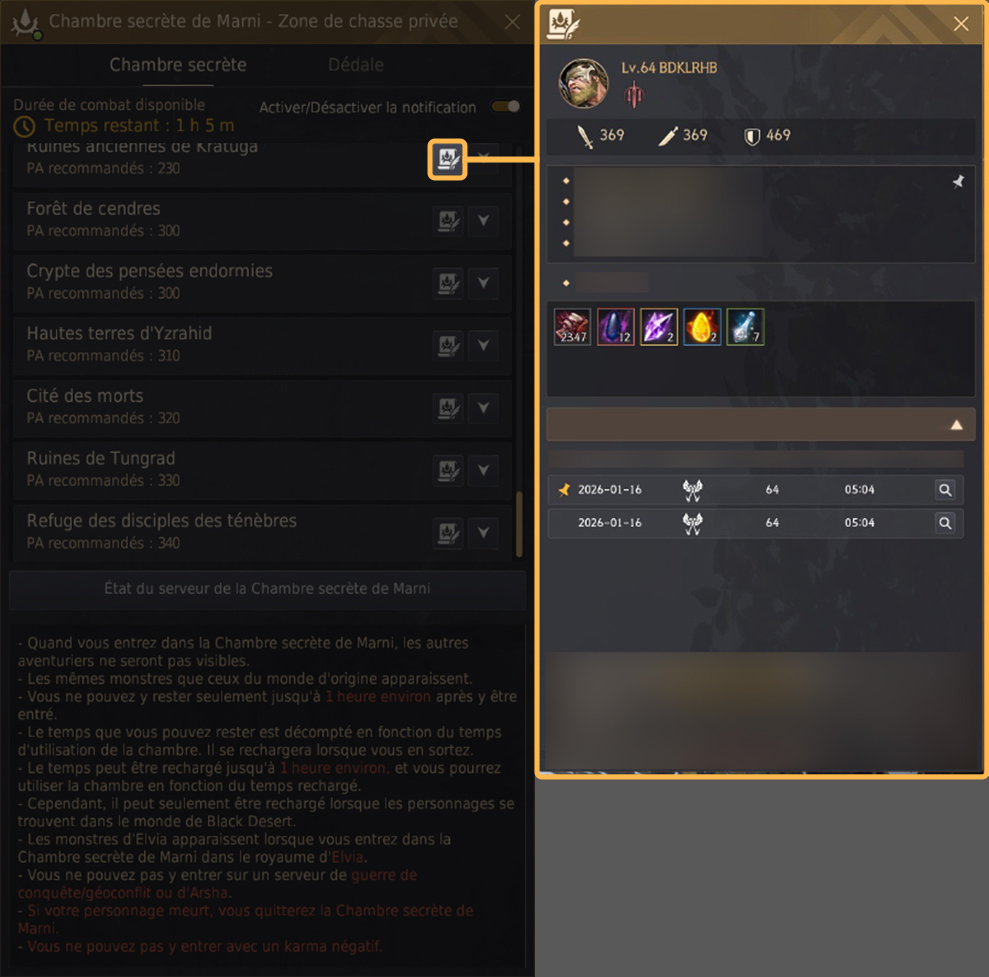
Guide du Rapport d'exploration de Marni
① Le bilan du Rapport est sauvegardé par personnage. Pour chaque zone de chasse, vous pouvez consulter le personnage utilisé, le nombre de monstres éliminés, les PA/PD ainsi que la date.
② Dans l'historique des butins, les butins divers sont affichés en priorité, suivi des autres objets classés par niveau de rareté, par ordre décroissant.
③ Le Rapport commence à être enregistré dès que vous entrez dans la Chambre secrète de Marni, et prend fin lorsque vous en sortez.
④ Après avoir utilisé la Chambre secrète de Marni, cliquez sur “Liste des butins par jour” dans l'écran du Rapport d'exploration de Marni pour consulter la liste des butins que vous avez obtenus par date.
⑤ Avec le bouton d'épinglage, vous pouvez enregistrer 1 bilan max par classe.
⑥ Si l'enregistrement épinglé correspond au plus récent, il est conservé. Mais s'il s'agit d'un enregistrement plus ancien, il sera supprimé.
⑦ Lorsque vous en enregistrez un autre, le bilan précédent sera supprimé.
• Le Rapport d'exploration de Marni permet de sauvegarder les données après avoir passé au moins 5 minutes dans la Chambre secrète et obtenu au moins Butin divers x1 000 de rareté blanche.
• Votre historique d'utilisation de la Chambre secrète avant la mise à jour ne sera pas sauvegardé dans le Rapport d'exploration de Marni.
① Le bilan du Rapport est sauvegardé par personnage. Pour chaque zone de chasse, vous pouvez consulter le personnage utilisé, le nombre de monstres éliminés, les PA/PD ainsi que la date.
② Dans l'historique des butins, les butins divers sont affichés en priorité, suivi des autres objets classés par niveau de rareté, par ordre décroissant.
③ Le Rapport commence à être enregistré dès que vous entrez dans la Chambre secrète de Marni, et prend fin lorsque vous en sortez.
④ Après avoir utilisé la Chambre secrète de Marni, cliquez sur “Liste des butins par jour” dans l'écran du Rapport d'exploration de Marni pour consulter la liste des butins que vous avez obtenus par date.
⑤ Avec le bouton d'épinglage, vous pouvez enregistrer 1 bilan max par classe.
⑥ Si l'enregistrement épinglé correspond au plus récent, il est conservé. Mais s'il s'agit d'un enregistrement plus ancien, il sera supprimé.
⑦ Lorsque vous en enregistrez un autre, le bilan précédent sera supprimé.
• Le Rapport d'exploration de Marni permet de sauvegarder les données après avoir passé au moins 5 minutes dans la Chambre secrète et obtenu au moins Butin divers x1 000 de rareté blanche.
• Votre historique d'utilisation de la Chambre secrète avant la mise à jour ne sera pas sauvegardé dans le Rapport d'exploration de Marni.
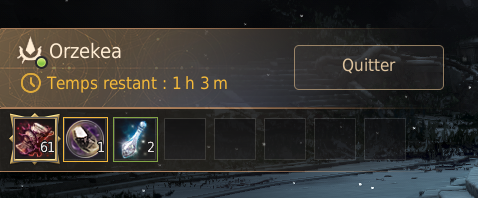
- Ajout d'une IU au bas du widget de sortie de la Chambre secrète de Marni afin de permettre de consulter en temps réel les butins obtenus dans la Chambre secrète.
* The content of the game guide may differ from the actual game content, depending on the update and content changes.